크롤링에 필요한 모듈을 받아서 진행하자
pip install requests
pip install bs4Remote Jobs in Programming, Design, Sales and more #OpenSalaries
Looking for a remote job? Remote OK® is the #1 Remote Job Board and has 597,553+ remote jobs as a Developer, Designer, Copywriter, Customer Support Rep, Sales Professional, Project Manager and more! Find a career where you can work remotely from anywhere.
remoteok.com
검색을 하면 url에 규칙이 있는 것을 확인할 수있다.
이를 이용해 필요한 부분의 태그를 분석하여 검색어를 넣어 자료를 가져오는 코드를 만들자
- https://remoteok.com/remote-{keyword}-jobs
일반적인 GET요청이긴하나 header에 User-Agent 값을 넣어주지 않으면 차단당한다.
어떤 브라우저에서 검색을 했는지에 대한 정보를 넣어줘야 동작하기 때문이다
약간의 기교라고 볼 수 있다.
User-Agent의 값은 검사기(F12 or 우클릭 - 검사)에서 확인 가능하다
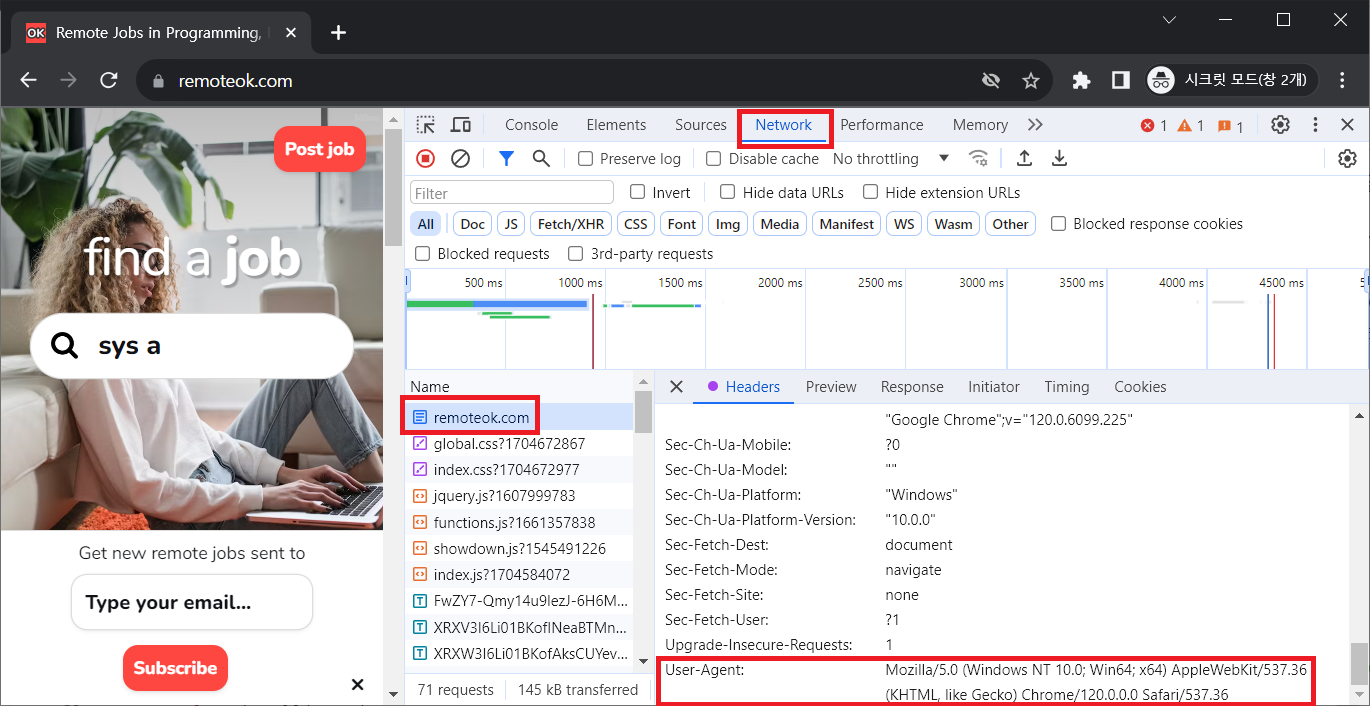
Network 탭에 가장 첫번째를 클릭하여 오른쪽에 정보가 나오면 가장 밑에 있다.
보이지 않는다면 검사기를 열고 새로고침(ctrl + shift + F5)를 누르면 갱신되어 보이게 된다
import requests
from bs4 import BeautifulSoup
import csv


class Scraper:

    def __init__(self, keyword):
        self.keyword = keyword
        self.data = []

    def get_response(self):

        response = requests.get(f'https://remoteok.com/remote-{self.keyword}-jobs',
                        headers = {
                            'User-Agent' :
                            'Mozilla/5.0 (Windows NT 10.0; Win64; x64) AppleWebKit/537.36 (KHTML, like Gecko) Chrome/120.0.0.0 Safari/537.36'
                                      })

        return BeautifulSoup(response.content, 'html.parser')

    def scrap(self):

        soup = self.get_response()
        jobs = soup.find_all('td', class_ = 'company_and_position')[1:]

        for job in jobs:
            title = job.find('h2').text.strip()
            name = job.find('h3').text.strip()
            url = job.find('a')['href']

            info = {
                "title" : title,
                "company_name" : name,
                "url" : f'https://remoteok.com/remote-jobs{url}'
                }

            self.data.append(info)

        return len(self.data)

    def to_csv(self):
        file = open(f"{self.keyword}_jobs_remoteok.csv", "w")
        w = csv.writer(file)
        w.writerow(
            [
                "Title",
                "Company",
                "URL"
            ]
        )
        data = self.data
        for d in data:
            w.writerow(d.values())
        file.close()
        return "success"

keywords = ['ios', 'java', 'flutter']

for k in keywords:
    scraper = Scraper(k)
    print(scraper.scrap())
print(scraper.to_csv())- get_response() : 페이지 정보 가져오기
- scrap() : 원하는 데이터 추출
- to_csv : csv파일로 만들어 데이터 확인
시간이 지나면 페이지는 변할 수 있기 때문에 항상 동작하지 않는다
상황에 맞게 변형하면서 필요한 자료를 가져올 수 있게 코드를 작성해야 한다.
'Python' 카테고리의 다른 글
| CentOS 7 에 Python 3.10 이상 설치 (0) | 2024.08.13 |
|---|---|
| 인공지능 로드맵 (0) | 2024.06.28 |
| bs4 응용 (0) | 2024.01.31 |
| playwright(동적 스크래핑) (0) | 2024.01.28 |
